You built your application with Node.js, Next.js, Express or Laravel, and your code lives on GitHub? Put it online without FTP, without a server to administer and without an international bank card. Connect your repository once: on every git push, your website updates itself.
That is what Sahara Pro and Sahara Business hosting allow. Your application runs continuously, without going to sleep, on your own domain name, and you pay in dinars by Edahabia or CIB card or by CCP deposit.
Why deploy from GitHub
- No more file transfers. No need to zip, upload over FTP and unzip. Your repository is the single source of truth.
- One update = one push. Fix, push to
main: the deployment starts automatically. - No risk of breaking the live website. If the build fails, the new version is not activated: your visitors keep seeing the previous version, which works.
- Your application stays on. The Node.js server is restarted automatically if it stops, and restarted on every new deployment. No SSH session to keep open.
- A real server, not just a static website. Express API, Next.js server rendering, background tasks: your backend answers all the time.
What you need
- A Sahara Pro or Sahara Business hosting plan. These are the plans that include Node.js and SSH access. Sahara Pro hosts up to three websites: ideal to keep your application separate from your business website. See the plans.
- Your code on GitHub, with a
package.jsonthat contains yourbuildandstartscripts. - Your domain name. With a 12- or 24-month commitment, the domain is free for the first year for eligible extensions. Search for a domain.
Connect your GitHub account
In your hosting panel, open GitHub connection then Connect GitHub. GitHub asks you which repositories to share: we recommend allowing only the ones you want to deploy. Your repositories then appear in the list, public and private.
Choose your repository and the build command
Click Deploy next to the repository, choose your website, then the branch to publish, usually main.
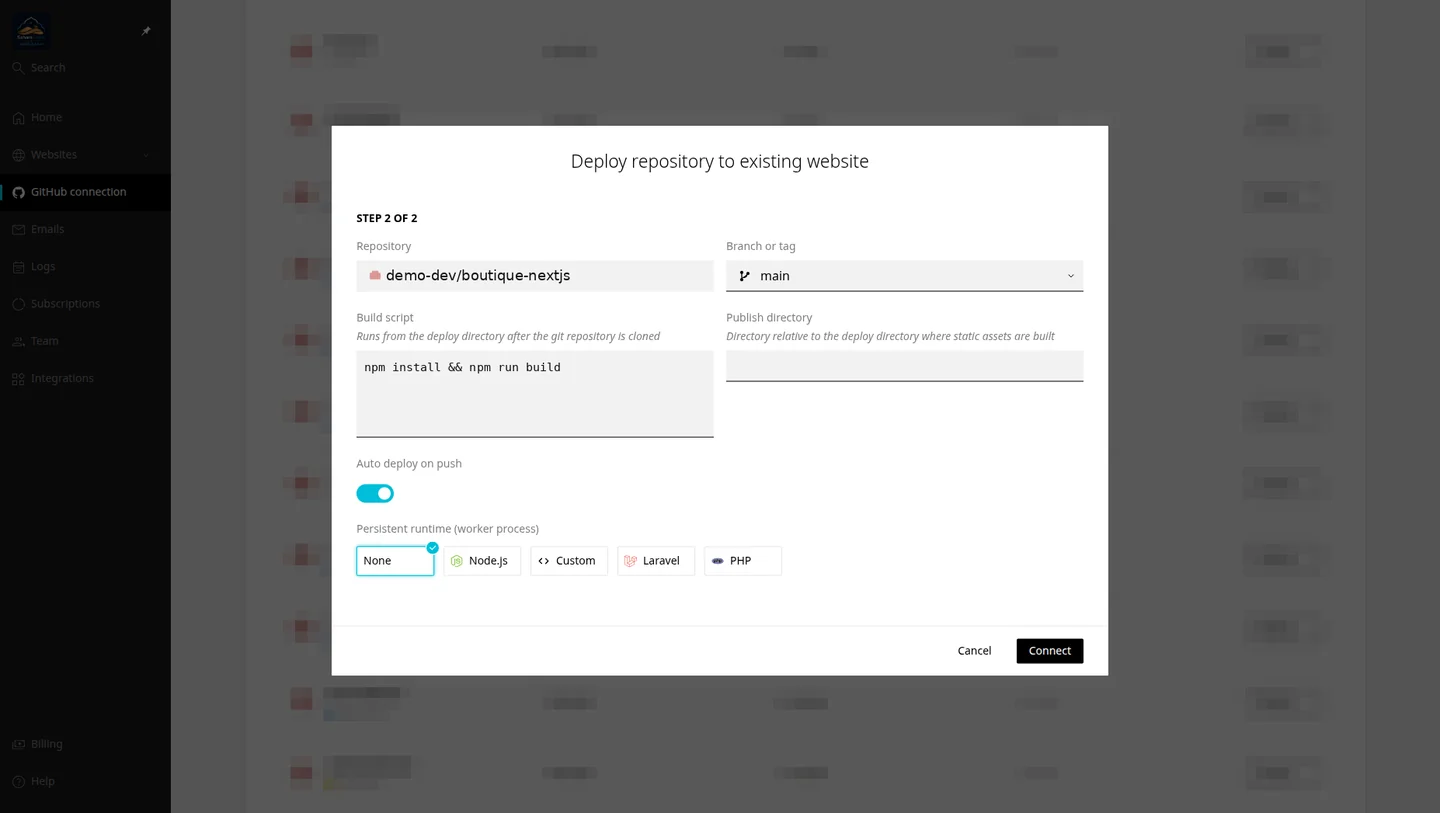
In Build script, enter the command that installs your dependencies and builds your project:
| Your project | Build script |
|---|---|
| npm | npm install && npm run build |
| pnpm | npx pnpm@10 install --frozen-lockfile && npx pnpm@10 build |
| Laravel | composer install --no-dev --optimize-autoloader |
Use the package manager and the version set in your project: if your package.json says "packageManager": "pnpm@10…", keep pnpm 10.
Leave Auto deploy on push enabled so that every push updates your website.
Publish directory is only for fully static websites, such as a built Vite or React project: enter the folder produced by the build, for example dist. For an application with a server (Next.js, Express), leave this field empty.
Start your Node.js application
Open Worker processes, then Configure and Node.js:
- Node.js version: choose a version compatible with your project. Next.js 16, for example, requires Node.js 20.9 or later.
- Startup command: the command that starts your server.
- Working directory:
deploys/current, the folder of the live version. - HTTP Proxy: enabled, with an empty Path to serve the whole website.
- Port: the port your application listens on, for example
3000.
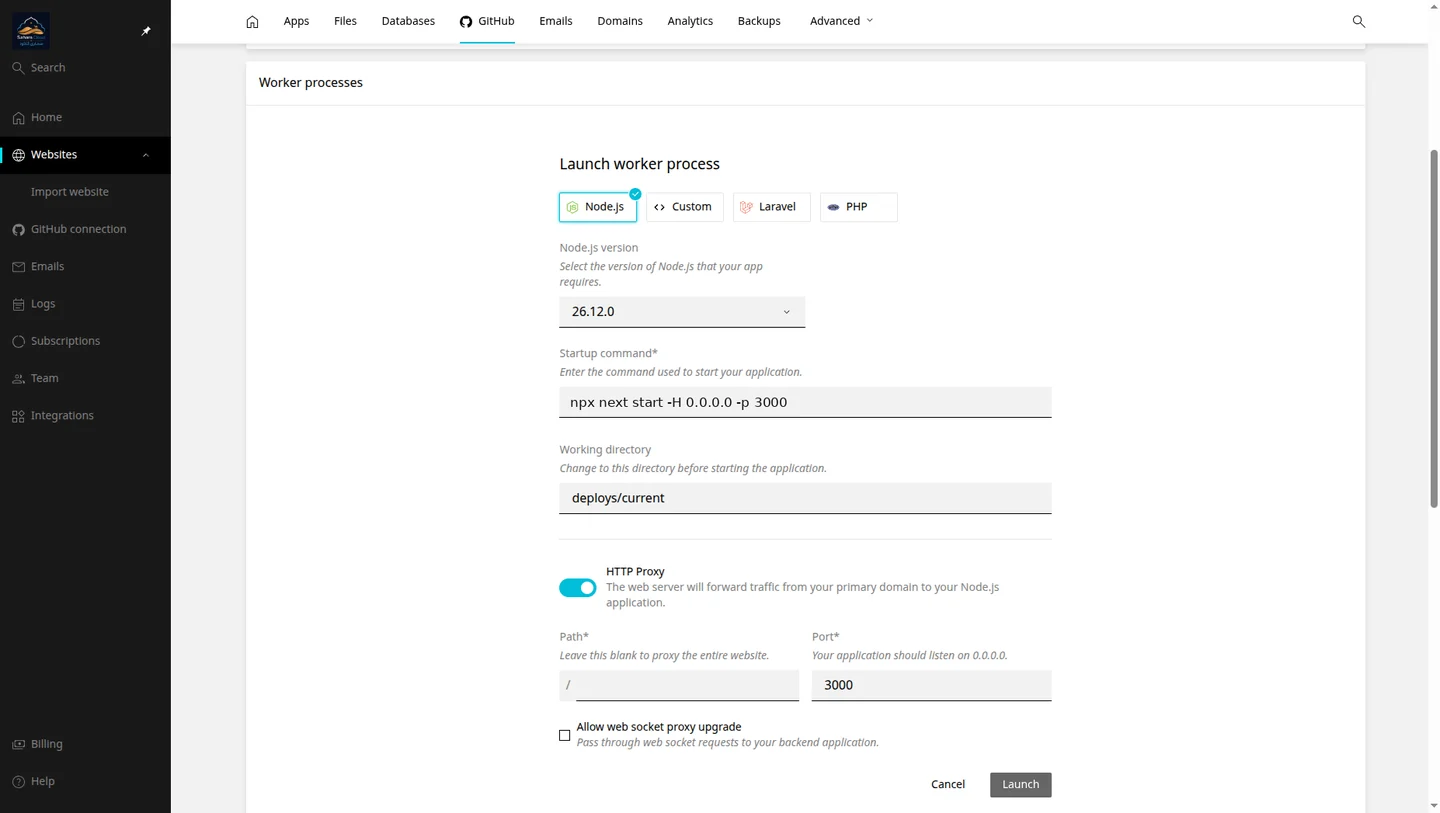
Your application must listen on 0.0.0.0 and on the chosen port:
| Your project | Startup command |
|---|---|
| Next.js | npx next start -H 0.0.0.0 -p 3000 |
| Express | node dist/server.js, with app.listen(3000, "0.0.0.0") in your code |
| Nuxt, Remix, Astro SSR… | your project’s start command, on the chosen port |
Click Launch: a few seconds later, your application answers on your domain.
Follow your deployments
Each deployment appears with its commit, its date and its full log. If something goes wrong, View logs shows exactly which line failed: a missing dependency, the wrong Node.js version or a script that cannot be found.
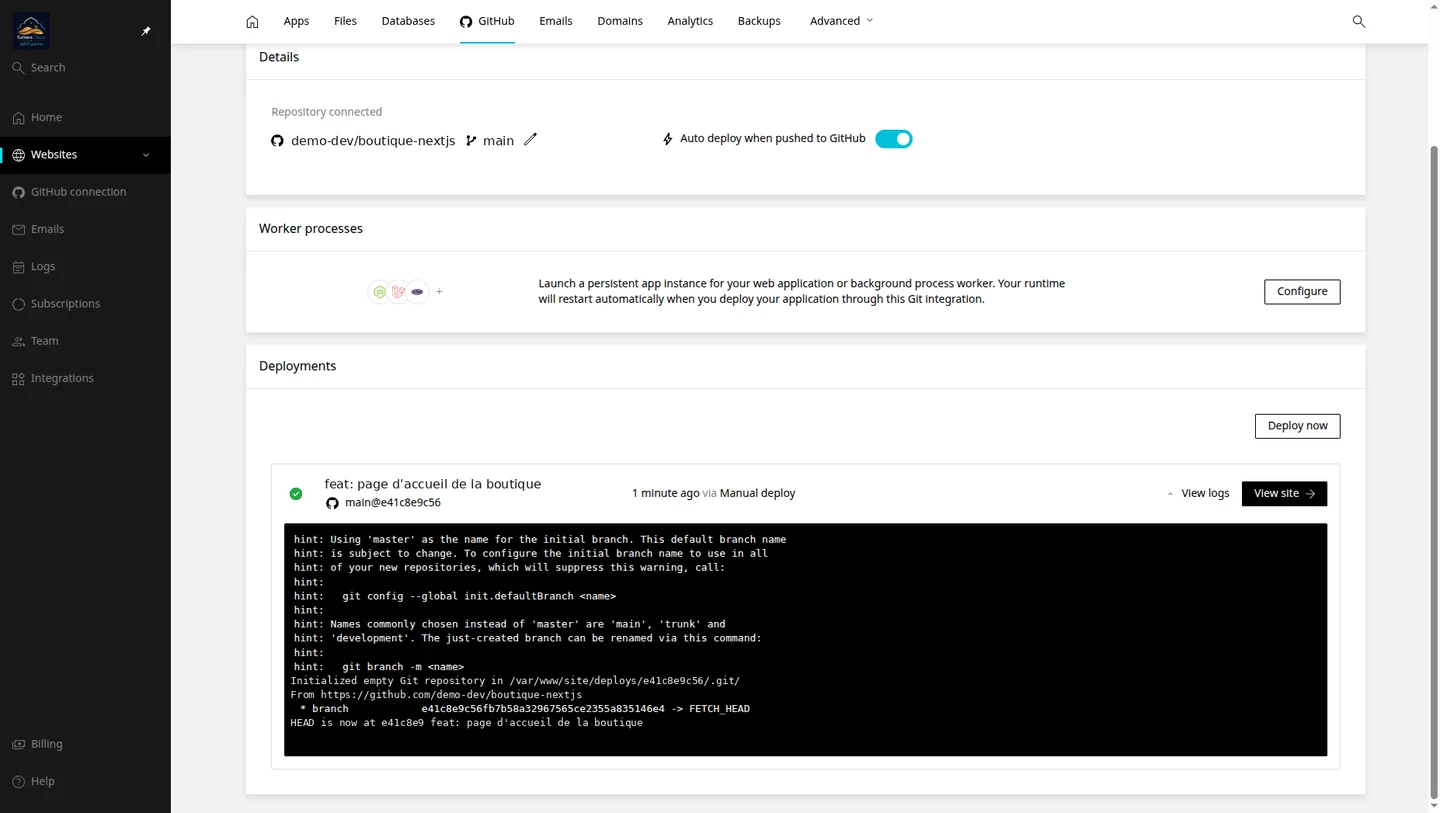
You can also redeploy a version at any time with Deploy now.
Your environment variables and secrets
Never put your keys in GitHub. Create a .env file on the server, outside the public folder, with the file manager or over SSH, and load it in your application, for example with dotenv or Node.js’s --env-file option. Your Supabase, Stripe or Resend keys stay private that way.
A simple rule: one website, one source
A website shows one source at a time: your GitHub application, a Sahara AI website or a WordPress. If you start a Node.js application on a website that already shows WordPress or Sahara AI, the application takes its place, even if the old files stay on the disk.
To run both side by side, use another website in your plan (for example app.yourdomain.com for the application and yourdomain.com for the business website), or serve your API on a specific path such as /api by filling in Path.
Frequently asked questions
Does my application go to sleep if nobody visits it? No. It runs continuously and answers from the first request, unlike free tiers that fall asleep after a few minutes of inactivity.
Can I use TypeScript?
Yes. Compile your code in the build script (tsc, next build, vite build…), then start the compiled version.
What if I prefer working over SSH? SSH and SFTP access is included with Sahara Pro and Business. You can combine both: GitHub for the code, SSH for one-off tasks.
Is my website backed up? Yes, automatically. After a restore, simply restart your application from Worker processes. Data hosted by an external service such as Supabase is backed up on that service’s side.
I am building for a client: who owns the hosting? Your client, if you create the account in their name. They pay and renew themselves, and you keep technical access with your SSH key.
Put your application online today
Connect GitHub, push your code and let SaharaCloud take care of the rest. Payment in dinars, support in French and Arabic.
To maintain your application, also read our update on the November 2026 Node.js security fixes (in French).