With Sahara Pro or Sahara Business hosting, n8n installs in one click from your hosting panel: no server to administer, no Docker, a free HTTPS certificate and a subscription paid in dinars. You choose an address, create your administrator account, and a few minutes later your automation platform is online.
We went through the whole journey on 23 November 2026 on a Business hosting plan: installation, sign-in, first published workflow, a webhook called from outside and an automatic restart. This guide reports what we observed.
What n8n can do for your business
n8n connects your tools to each other and runs repetitive tasks for you. Each automation, called a workflow, starts from a trigger and then chains actions:
- An order arrives in your shop: n8n records it in a Google Sheets spreadsheet, notifies your team on Telegram and sends the customer a confirmation e-mail.
- A contact form is filled in: the request is sorted, passed to the right person and added to your list of prospects.
- An AI agent prepares a reply: n8n sends the message to an AI model of your choice, with your own key, then submits the suggestion to you before sending.
- A report every morning: yesterday’s figures, pending invoices or today’s appointments, sent automatically.
n8n offers hundreds of ready-made integrations and a Webhook node that gives each workflow an address your other services can call.
n8n in one click or on a VPS: which to choose?
| Your need | One-click n8n (Sahara Pro and Business) | n8n on a VPS |
|---|---|---|
| Installation | From the panel, without the command line | Docker and HTTPS proxy to configure yourself |
| HTTPS certificate | Obtained automatically | To set up |
| Restart if it stops | Automatic (checked in our test) | Depends on your configuration |
| Administrator account | Created with the password chosen in the panel | To create on first opening |
| Root access, Docker, PostgreSQL database | No | Yes |
| For whom | Small businesses, shops, agencies, first automation projects | Intensive use or custom configurations |
To get started, the one-click installation is enough in most cases. If you need Docker, a PostgreSQL database or many simultaneous executions, follow our guide hosting n8n on a VPS instead.
The n8n installer is available with the Sahara Pro and Sahara Business plans of the web range. Compare the hosting plans.
Installing n8n in one click, step by step
- From your client area, open the hosting panel of your Pro or Business plan.
- In Websites, click Add website, then choose N8N among the applications.
- Choose n8n’s address:
- Production website: your own domain or a subdomain, for example
automation.yourdomain.dz. It must point to your hosting; if your domain is with SaharaCloud, our support team can tell you which DNS record to create. - Staging website: a temporary
.saharacloud.siteaddress, ideal for trying n8n before opening it to your team.
- Production website: your own domain or a subdomain, for example
- Fill in the n8n administrator account: e-mail address and password. The password must be at least 10 characters long, with a lowercase letter, an uppercase letter, a digit and a special character.
- Click Add.
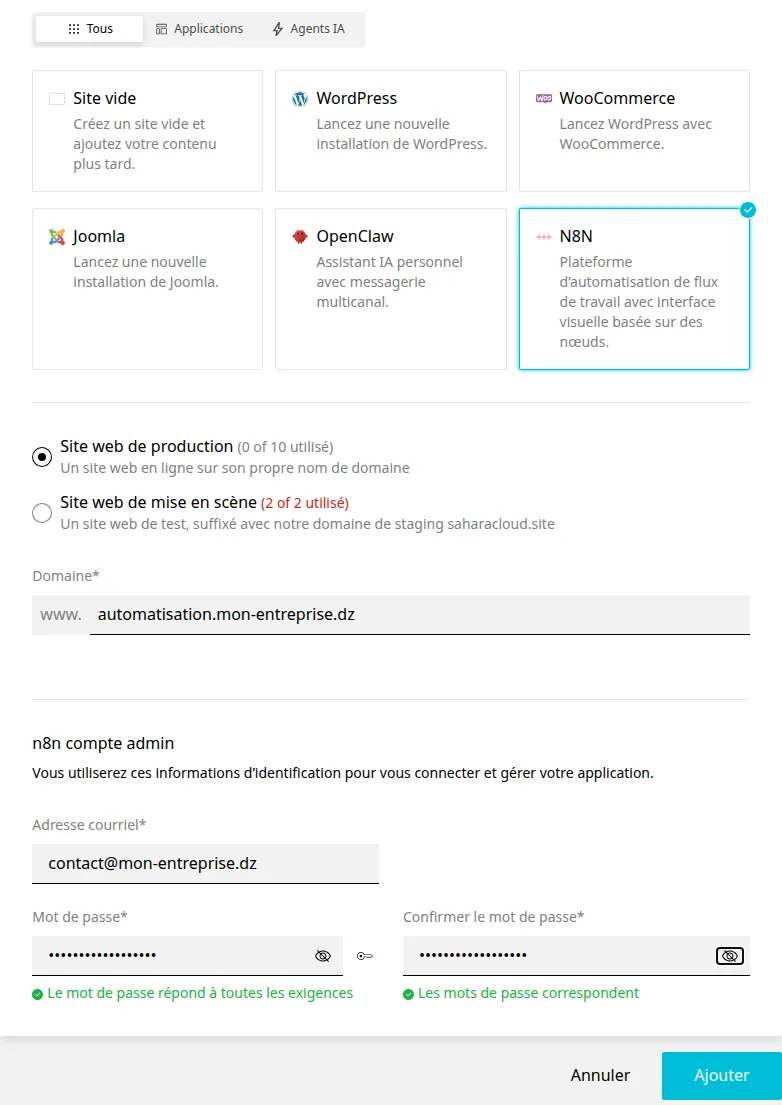
Allow a few minutes: the panel installs n8n and then starts it. The application then appears in the site’s Apps tab, with its address and a Dashboard button to open it.
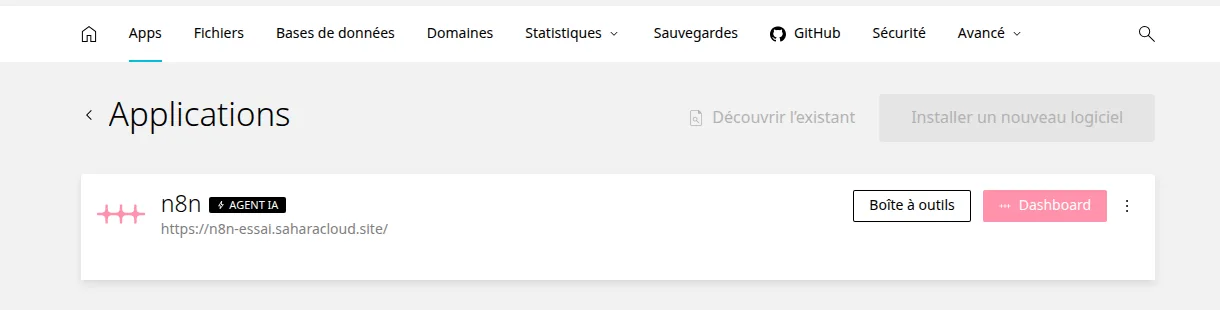
If n8n has not appeared after about ten minutes, contact our technical support with the address you chose.
First sign-in and first workflow
Open your n8n address and sign in with the e-mail and password chosen in the panel. The owner account already exists: nobody else can create it in your place by opening the address before you. On first launch, n8n asks a few optional questions and may offer a free licence key for extra features; you can skip these steps. The n8n interface is in English.
For a first try, create a workflow with a Webhook node (POST method) followed by a Respond to Webhook node, then click Publish. The production address looks like https://your-address/webhook/your-path.
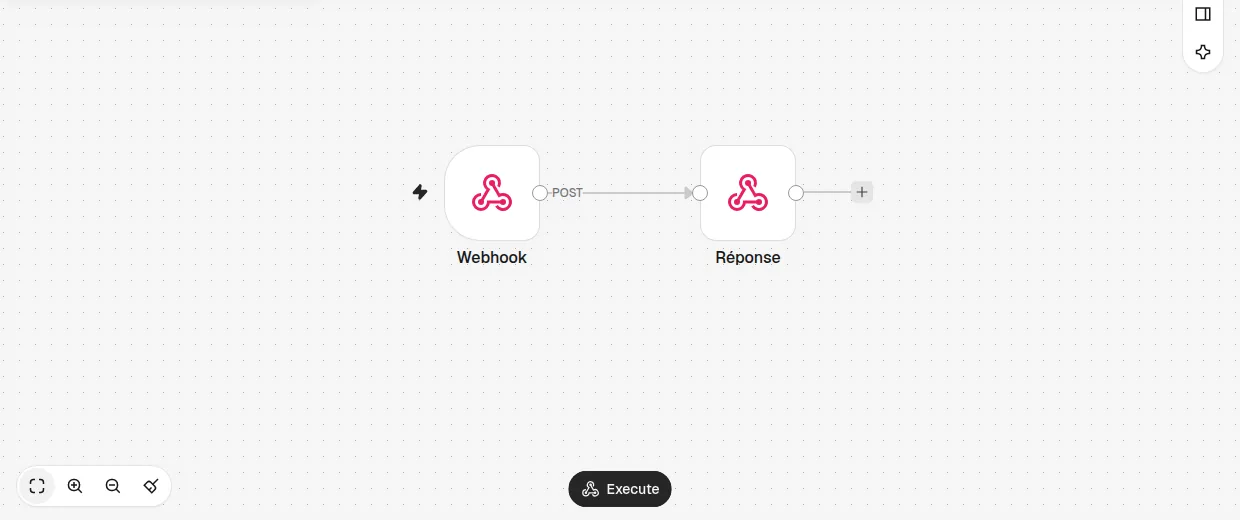
In our test, this workflow answered from outside, on Algiers time:
curl -X POST https://automatisation.yourdomain.dz/webhook/nouvelle-commande \
  -H "Content-Type: application/json" -d '{"produit":"Sahara Business"}'
{"recu":true,"produit":"Sahara Business","heure_alger":"21:59"}
As long as the workflow is not published, the production address answers with a 404 error: this is normal. While you are fine-tuning, use the test address offered by the Webhook node.
Security: good habits
- Turn on “Force HTTPS”. In the panel, open the site’s Security tab, then turn on Force HTTPS on your domain’s line. Visits over
http://are then redirected tohttps://. In our test, the certificate was active from installation, but the redirect was not turned on by default. - Choose a unique password for n8n and do not share it. To give a colleague access, invite them from the n8n settings.
- Protect your webhooks. A webhook address can be called by anyone who knows it: use a path that is hard to guess and, for sensitive data, the authentication offered by the Webhook node.
- Keep your API keys in n8n’s credentials (Credentials), never in plain text in a node or a message.
The self-hosted edition of n8n is published under the Sustainable Use License. It covers use for your business’s internal needs: read it if you plan to offer n8n to your own clients.
Resources, backups and updates
- Continuous operation: n8n runs permanently in your website’s space. In our test, after the process was force-stopped, n8n restarted on its own within a few seconds and the published workflow answered again.
- Memory: at rest, our instance used about 600 MB. Everyday use fits within the Pro and Business plans; for heavy or very frequent processing, choose a VPS.
- Data: n8n stores its workflows, encrypted credentials and history in your website’s space. These files are part of the hosting backups, visible in the Backups tab. Also export your important workflows from n8n (workflow menu, then Download) before any major change.
- Updates: our test installation used n8n 2.48.8, the version offered on 23 November 2026. Updating n8n is not yet done with a button in the panel: contact our technical support, who will tell you how to proceed.
Ready to automate? Order Sahara Pro or Business hosting, pay in dinars by CIB or Edahabia, then install n8n from your panel. Need an AI assistant as well? The installer also offers OpenClaw.